
Track Token Usage in Account History
How to review token purchases, per-book usage, refunds, and downloadable reports in Coloring Magic Art Account History. Track spend with clarity.
Buying tokens is only half the picture. You also want to know where they went — which book used how many, whether any came back as refunds, and what you paid on checkout.
Coloring Magic Art puts that in Account History: purchases on one tab, generation spend per project on another, plus PDF exports for your records.
This guide walks through each view. For package prices, see Understanding Pricing and Tokens. For when refunds appear, see Automatic Token Refunds on Failed Generations.
Where to find it
- Sign in to Coloring Magic Art.
- Open your profile menu and choose Account History, or go to Account History directly.
- Use the Orders and Token Usage tabs to switch views.
Your current balance also appears on Pricing and in the editor while you work.
Orders tab — what you bought
The Orders tab lists every token purchase:
| Column | What it shows |
|---|---|
| Date | When the order completed |
| Order value | Amount paid (EUR) |
| Tokens | Tokens added to your balance |
| Status | Completed, pending, or failed |
| Balance before / after | Your balance around that purchase |
| Payment method | Card checkout (or admin grant if applicable) |
| Invoice | Download link for the PDF invoice when available |
This is the paper trail for expenses — useful for classroom budgets, business records, or simply confirming that checkout worked.
Use Download PDF at the top of Account History to export the orders table.
Token Usage tab — what each book spent
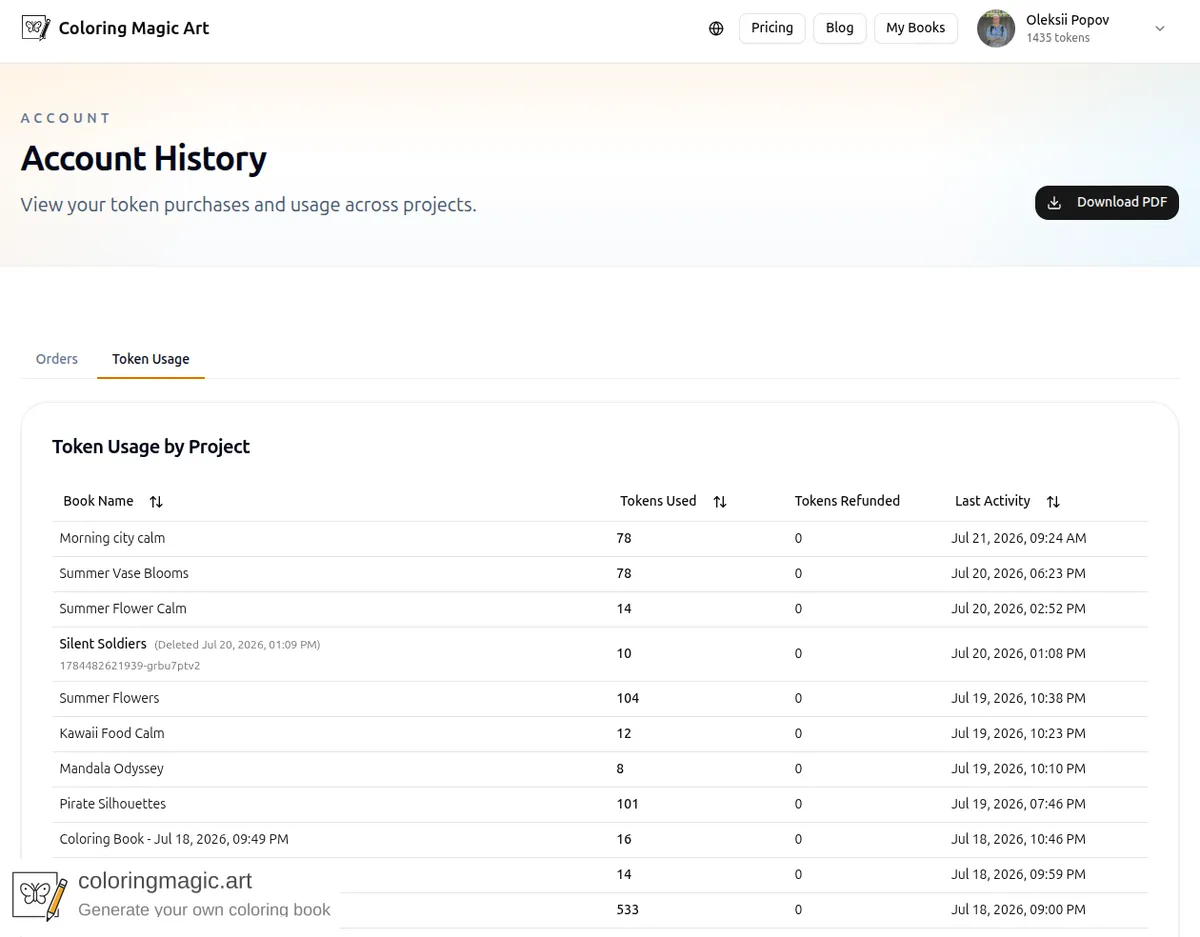
The Token Usage tab groups generation activity by coloring book project:
| Column | What it shows |
|---|---|
| Book name | Project title — click to open the editor (unless the book was deleted) |
| Tokens used | Total tokens spent generating and regenerating pages in that book |
| Tokens refunded | Tokens returned after technical failures on that book |
| Last activity | Most recent generation or refund on that project |
A book with 8 tokens used and 0 refunded might be a clean Low-quality first draft. 176 used and 0 refunded might be a full Low-then-High workflow like the Nice family trip example. If a page failed technically, you may see tokens refunded rise while net spend stays fair.
Deleted books stay in the list with a Deleted label so past usage is not hidden.
Download a PDF report
The Download PDF button exports whichever tab you are viewing:
- Orders → orders history PDF
- Token Usage → per-project usage PDF
Reports include your account email and generation timestamp. Handy for reimbursements, homeschool records, or your own filing.
How this fits the pay-per-page model
Coloring Magic Art does not charge a monthly subscription. You buy tokens when you need them and spend them page by page. Account History is how you see that model in practice — not a single opaque charge, but a line per book and per purchase.
That pairs with the rest of the pricing guides:
- What Costs Tokens (and What Is Free) — wizard and PDF steps do not appear as usage until images run
- Automatic Token Refunds on Failed Generations — refunds show in the Tokens Refunded column
Quick answers
Does downloading a PDF increase Tokens Used?
No. PDF export is free. Usage reflects image generation only.
I deleted a book — can I still see its usage?
Yes. Deleted projects remain on the Token Usage tab with a deleted marker.
Where is my current balance?
On Pricing when signed in, in the editor, and implied by your latest order's balance-after column.
Can I get an invoice?
Completed card purchases include invoice download links on the Orders tab when available.
Related guides
- Understanding Pricing and Tokens
- What Costs Tokens (and What Is Free)
- Automatic Token Refunds on Failed Generations
Ready to make your own?
Open the editor and adapt the prompt for your next coloring book page.
You might also like
More articles with overlapping topics.